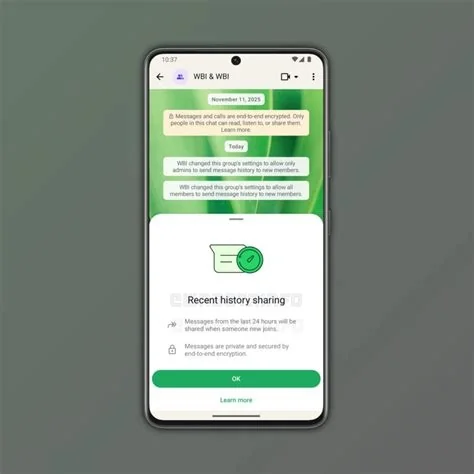
WhatsApp just introduced Group Message History, a feature that lets new members instantly view recent chat messages when they join a group. Admins can control how many past messages are shared, typically starting at 25, so you’ve got enough context without exposing older content. This cuts the awkward “what did I miss?” moment and speeds up onboarding.
How Group Message History Works
When a new participant is added, WhatsApp prompts the group admin—or any member with permission—to decide whether to share past messages. If they enable the option, a selected slice of the chat appears at the top, clearly separated from the ongoing conversation. Existing members receive a notification, keeping everyone aware of the added context.
Why the Feature Matters Now
Group chats serve as workspaces, community hubs, and family circles, and onboarding new members often stalls productivity. By offering an instant glimpse of recent discussions, the feature eliminates the need for manual summaries or screenshots, letting you jump straight into the conversation.
User Benefits and Security
Key advantages include:
- Faster onboarding: New members see up to 25 recent messages without waiting for a summary.
- Privacy control: Admins set the exact number of messages, keeping older, sensitive content hidden.
- End‑to‑end encryption: Shared history is re‑encrypted with the existing group key, so only group participants can read it.
Real‑World Use Cases
Imagine adding a contractor mid‑project. You can grant a 30‑message snapshot, letting the contractor catch up on decisions instantly. In casual family groups, you might limit the view to the last 10 messages, protecting inside jokes while still providing context.
Practitioner Insight
“In our remote‑first consultancy, we rely on WhatsApp for quick client updates. Before this feature, onboarding a new analyst meant a flurry of screenshots and TL;DR messages. Now we can share a 50‑message snapshot, and the analyst is up to speed within minutes,” says a senior project manager. “The admin‑controlled toggle gives us confidence that we’re not inadvertently exposing older, confidential discussions.”
Getting Started with the New Toggle
To enable Group Message History, open the group info screen, locate the “Share history with new members” toggle, and set the desired number of messages. The option appears for groups running the latest app version on Android or iOS.
Bottom Line
Group Message History fills a long‑standing usability gap while preserving WhatsApp’s core privacy promise. By letting admins decide how much past context to share, the platform balances onboarding ease with security, delivering a subtle yet powerful productivity boost for millions of daily group chats.