
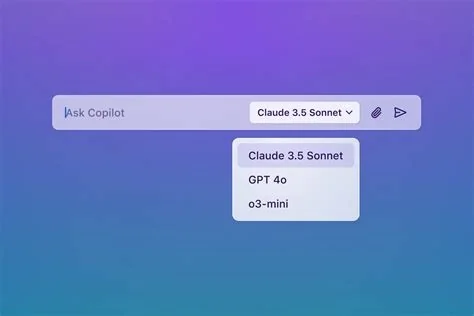
GitHub Copilot X lets you pick the AI model that fits your codebase, turning generic suggestions into context‑aware completions. By training custom models on private repositories, the tool narrows the gap between what developers expect and what the assistant delivers, driving acceptance rates well above the typical 30 % baseline. The result is faster, more reliable code without sacrificing security.
Why Model Selection Matters
When the AI draws from a model that knows your project’s naming conventions, logging framework, and error‑handling patterns, the suggestions feel native instead of generic. That relevance pushes acceptance rates from a third of suggestions up toward half or more, meaning you spend less time fixing boilerplate and more time solving real problems.
How Copilot X Works
Custom Model Training
Copilot X can ingest a team’s private code, learning the structure, documentation style, and commit‑history signals. The resulting model generates code that matches the exact style guide you’ve cultivated, so the output blends seamlessly with existing files.
Agentic Automation
Beyond single‑line completions, the built‑in coding agent automates repetitive tasks—bulk refactors, test scaffolding, or ticket triage. You can assign a lightweight model for quick one‑liners, a heavyweight custom model for architectural changes, and the agent for large‑scale operations, creating a flexible workflow that adapts to each task.
Security and Compliance
All analysis of private repositories stays inside your organization’s boundaries. The custom model training runs behind the scenes, ensuring that proprietary logic never leaves your secure environment. This closed‑loop approach satisfies compliance requirements while still delivering the productivity boost of AI assistance.
Real‑World Impact
Imagine a sprawling microservices platform. You ask Copilot X to create a new endpoint, and the AI automatically applies your team’s logging calls, error‑handling conventions, and documentation templates. A junior engineer onboarding a legacy monolith receives suggestions that respect existing quirks, dramatically shortening the learning curve.
- Higher acceptance rates—teams report jumps from ~30 % to >55 % when using private models.
- Reduced manual edits—code arrives ready to merge, cutting review time.
- Consistent style enforcement—the AI mirrors your internal standards without extra linting rules.
Best Practices for Teams
To get the most out of Copilot X, you should:
- Enable custom model training on the repositories that define your core patterns.
- Configure custom instructions or prompt files to steer the AI away from known pitfalls.
- Combine models—use a fast generic model for exploratory work and switch to the custom model for production‑ready code.
- Continuously review AI output, especially in security‑critical paths, to catch any hidden bugs.
Getting Started with Copilot X
First, activate model selection in your GitHub settings. Then grant Copilot X access to the private repos you want it to learn from. Finally, choose the appropriate model for each workflow—lightweight for quick fixes, custom for deep integration, or the coding agent for bulk tasks. Once set up, you’ll see the AI adapt to your codebase, letting you focus on design rather than repetitive drafting.


