
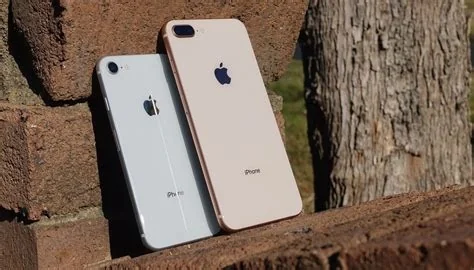
Telstra has reported a nationwide call outage affecting iPhone 8, iPhone 8 Plus, and iPhone X devices running Apple’s iOS 16.7.13 update. The bug prevents both regular and emergency voice calls on Telstra’s network, while data services remain functional. Users can temporarily avoid the issue by rolling back the update or using alternative communication methods.
What Caused the Call Outage?
Apple released iOS 16.7.13 on 26 January, targeting newer iPhone models. Within hours, owners of iPhone 8, iPhone 8 Plus, and iPhone X reported that voice calls—including emergency calls to Triple Zero (000)—stopped working on Telstra’s 4G/5G network.
iOS 16.7.13 Update and Affected Devices
- iPhone 8 – iOS 16.7.13
- iPhone 8 Plus – iOS 16.7.13
- iPhone X – iOS 16.7.13
Technical Explanation
The update modified the radio stack, the software layer that controls communication with cellular towers. On legacy baseband firmware used by the three older models, the new stack conflicts with Telstra’s network protocols, causing a loss of voice‑call functionality while leaving LTE/5G data unaffected.
Radio Stack Conflict with Legacy Baseband
Older iPhone hardware relies on a different baseband architecture than newer devices. The iOS 16.7.13 changes were not fully compatible with Telstra’s 4G/5G implementation, resulting in the call‑failure bug.
Impact Scope
Telstra describes the issue as nationwide, meaning any subscriber with an affected device on its network may experience the outage. Although exact subscriber numbers are undisclosed, the three models still represent a significant share of the Australian iPhone market, especially among cost‑conscious users.
Telstra’s Response and Workarounds
Telstra advises affected customers to either revert to iOS 16.7.12 (where possible) or postpone the iOS 16.7.13 installation until a fix is released. The carrier is monitoring call‑failure metrics in real time and has escalated the problem to its engineering partners.
Immediate Actions for Users
- Check iOS version: Settings → General → About.
- Avoid the update: Stay on iOS 16.7.12 if already installed.
- Use alternative communication: Data‑based messaging apps or a secondary phone for voice calls.
- Report the issue: Contact Telstra support and reference the “iOS 16.7.13 call outage.”
Future Outlook and Fix Timeline
Apple typically issues a quick‑fix patch within days of a reported bug. Industry observers expect a targeted iOS update to resolve the compatibility issue, followed by verification testing with Telstra’s network engineers.
Quick Checklist for Affected Users
- Confirm you are running iOS 16.7.13.
- If possible, downgrade to iOS 16.7.12.
- Switch to data‑only messaging for non‑emergency communication.
- Use a landline, secondary phone, or VoIP service for emergency calls.
- Report the problem to Telstra to aid tracking and resolution.


