
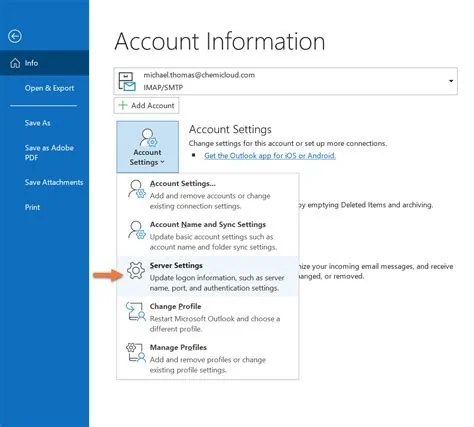
Outlook 365 now requires multi‑factor authentication (MFA) for all Business accounts, tightening security while adding a sign‑in step for users. At the same time, some users report a Yahoo Mail connection failure caused by token handling, and Microsoft’s new Copilot assistant is rolling out to automate email tasks. Here’s what the changes mean for you and your organization.
Mandatory MFA for Outlook 365 Business Accounts
Starting soon, every Business user must verify their identity with a second factor—typically a mobile app or text code. This requirement blocks most credential‑theft attacks, because attackers need more than just a password to access mail. However, the extra step can frustrate users who are used to a single click sign‑in.
What MFA Means for Users
When you log in, Outlook 365 will prompt you to approve the sign‑in on your phone or enter a code. If you haven’t set up a second factor, the system will guide you through the enrollment process. Admins should roll out clear instructions and offer quick‑help channels to keep productivity humming.
Yahoo Mail Connection Issue in Outlook 365
Some Outlook 365 installations suddenly lose their Yahoo Mail link, even though the Yahoo account works fine in a web browser. The problem stems from how Outlook handles OAuth tokens for Yahoo’s servers, causing the connection to drop after a token refresh.
Root Cause and Temporary Workaround
The quickest fix is to force a re‑authentication from the web portal, then remove and re‑add the Yahoo account in Outlook. This resets the token and restores the link. While it’s not a permanent solution, it buys you time until Microsoft patches the client.
Copilot Integration Elevates Outlook Productivity
Microsoft’s AI‑driven Copilot is now embedded in Outlook 365, letting you turn natural language into actions. Type a prompt like “Summarize last week’s sales emails,” and Copilot will generate a concise briefing right in your inbox.
Real‑World Benefits for Admins
Admins have already used Copilot to draft policy‑update emails about the MFA rollout, cutting writing time dramatically. You can also ask Copilot to schedule meetings, draft replies, or pull data from spreadsheets without leaving Outlook.
Streamlined Account & Billing Management
A unified portal now lets you view license allocations, renewals, and usage metrics in one place. This centralization reduces the admin overhead of juggling multiple consoles, especially for midsize firms handling several Microsoft 365 subscriptions.
Key Takeaways for IT Leaders
- Security boost: MFA will slash compromised Business accounts, but it demands solid user education.
- Compatibility alert: Keep an eye on third‑party OAuth changes; the Yahoo glitch shows that token flows aren’t set‑and‑forget.
- AI advantage: Copilot transforms Outlook from a passive inbox into an active assistant, saving time on repetitive tasks.
- Admin efficiency: The new account hub consolidates billing and licensing, easing the management burden.
Navigate these changes thoughtfully, and Outlook 365 can remain a reliable workhorse for your organization.


