
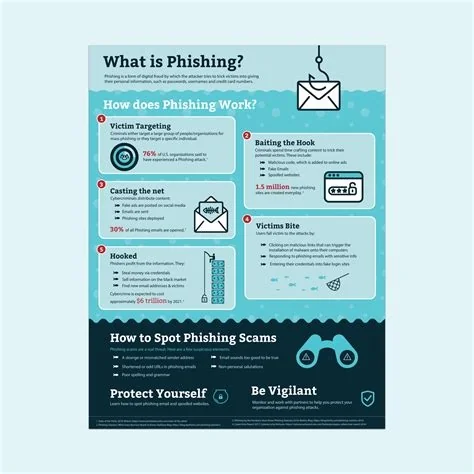
Phishing is a social‑engineering attack that tricks you into handing over credentials, financial data, or other sensitive information. It relies on convincing fake messages, urgent language, and forged identities rather than software bugs. By recognizing the common tricks and verifying every request, you can stop the attack before it compromises your accounts.
How Phishing Operates
Attackers craft messages that look like they come from trusted sources—banks, delivery services, or coworkers. They embed a sense of urgency, such as “Your account will be suspended,” to push you into acting quickly. The goal isn’t to exploit a technical flaw; it’s to exploit your trust.
Seven Common Phishing Tactics
- Impersonated Branding: Logos, colors, and language mimic legitimate companies.
- Urgent Calls to Action: Threats of account closure or missed deliveries force rapid clicks.
- Fake Login Pages: URLs look authentic but redirect to credential‑stealing sites.
- Malicious Attachments: Documents contain macros that install malware once opened.
- SMS Phishing (Smishing): Text messages deliver short, deceptive links.
- Voice Phishing (Vishing): Callers pretend to be executives or support agents.
- Spear‑Phishing: Personalized emails use details from social media to increase credibility.
Why Phishing Is Growing
The digital world is flooded with legitimate communications—work‑from‑home notices, banking alerts, and delivery updates. This noise makes it harder to spot a fake message. As more people rely on email and instant messaging, attackers find a larger pool of potential victims, and the financial payoff continues to rise.
Practical Steps You Can Take
Verify Before You Trust
Never enter credentials on a link you didn’t request. Use a known phone number or official website to confirm the request’s authenticity.
Hover and Inspect
Hover over any link to see the real URL. A mismatched domain or misspelled name is a classic red flag.
Keep Software Updated
Even though phishing doesn’t need a software bug, many attacks attach malicious payloads that exploit outdated browsers or plugins. Regular updates close those doors.
Use Multi‑Factor Authentication (MFA)
Even if a password is compromised, MFA adds an extra layer that attackers must bypass, dramatically reducing the chance of a successful breach.
Organizational Defense Strategies
Security teams find that education outperforms technology in the phishing arms race. Run quarterly mock phishing drills, track click‑through rates, and tailor training to address the most common mistakes—like entering credentials on look‑alike login pages.
Deploy email threat intelligence that flags known phishing domains in real time, but remember that the strongest defense is a skeptical workforce. Adopt a zero‑trust mindset: treat every credential request as potentially malicious until proven otherwise.
Future Risks: AI‑Generated Deepfakes
Artificial intelligence can now produce voice clips and video messages that sound exactly like a CEO or government official. When attackers combine deepfake media with traditional phishing lures, the deception becomes even harder to detect. Staying vigilant and verifying through independent channels will remain essential.
Bottom Line
Phishing isn’t a software bug you can patch; it’s a deception you must outsmart. Stay skeptical, verify every request, and make security awareness a daily habit. The next time you see an “urgent” login request, ask yourself: is this really who it claims to be, or just another clever lure?

