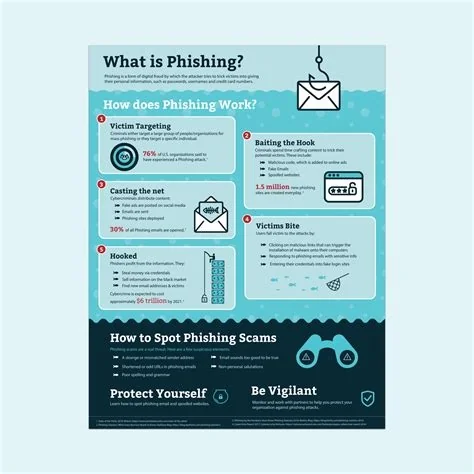
Phishing is a deceptive cyber‑attack that tricks you into revealing passwords, financial data, or installing malware by masquerading as a trusted source. It shows up in emails, texts, calls, and even social media messages. Recognizing the common signs and applying simple safeguards—like verifying senders, using MFA, and keeping software updated—can stop most attacks before they compromise your data.
What Is Phishing?
At its core, phishing relies on social engineering. Attackers craft messages that look legitimate—often mimicking banks, retailers, or colleagues—to lure you into sharing confidential information or clicking malicious links. The goal is simple: gain unauthorized access to accounts, steal money, or install harmful software on your device.
Common Phishing Variants
Clone Phishing
This technique copies a genuine email you previously received and replaces its attachment or link with a malicious version. The familiar format makes it especially convincing.
Spear Phishing
Targeted attacks use personal details such as your name, job title, or recent projects to create a tailored bait that feels authentic.
Whaling
Whaling focuses on senior executives, posing as board‑level communications or high‑value requests to extract sensitive corporate data.
Smishing & Vishing
These variants move the attack to SMS (smishing) or voice calls (vishing), exploiting the same trust tricks on different channels.
Red Flags You Can’t Miss
- Unexpected sender or domain mismatch: Legitimate organizations use their official domains; look out for odd addresses.
- Generic greetings: Phrases like “Dear Customer” often replace your real name.
- Urgent or threatening language: Messages that demand immediate action aim to create panic.
- Suspicious links: Hover over URLs to check the true destination; misspellings or extra characters are warning signs.
- Unsolicited attachments: Especially executable files (.exe, .scr) or macro‑enabled documents.
How to Protect Yourself
- Verify before you click: If an email claims to be from your bank, open a new browser window and log in directly.
- Enable multi‑factor authentication (MFA): A stolen password alone won’t grant access when a second factor is required.
- Keep software patched: Updates close vulnerabilities that phishing payloads often exploit.
- Use email security tools: Spam filters, DMARC, and anti‑phishing extensions catch many malicious messages before they reach you.
- Report suspicious messages: Forward them to your IT or security team to help protect the whole organization.
Why Phishing Matters
A successful phishing attack can serve as a foothold for larger breaches, allowing attackers to move laterally across networks, exfiltrate data, or deploy ransomware. For individuals, the fallout may include identity theft, financial loss, and damaged reputation. Businesses face regulatory fines, legal liabilities, and eroded customer trust when a single compromised credential leads to a major incident.
Future Trends
As digital communication becomes more seamless, phishing tactics evolve. Deep‑fake audio and AI‑generated text are already being weaponized to make scams sound eerily authentic. The best defense remains a skeptical mindset: treat every unsolicited request for personal information as a potential trap, stay educated, and keep your security tools up to date.