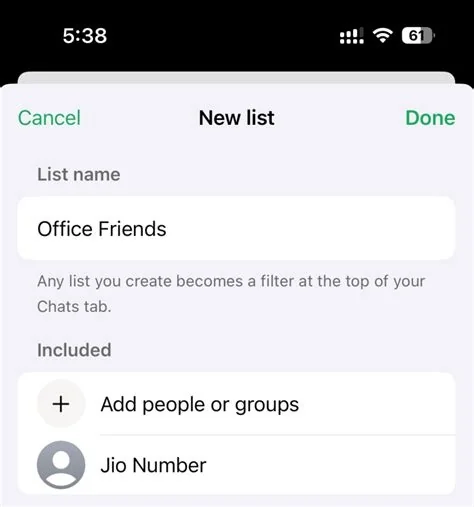
WhatsApp’s upcoming Custom Lists feature lets you create named audience groups—like Family, Work, or Friends—and toggle them when posting a status. This gives you precise control over who sees each 24‑hour update, eliminating the need to switch between broad “Everyone” or “Only share with…” settings. In short, it makes status privacy more granular and user‑friendly.
How Custom Lists Work
When you open the status composer, a new “Lists” tab appears. From there you can add contacts to a list, rename the list, or delete it. The app also includes a pre‑populated “Close Friends” list for quick access. Each time you share a photo, video, or text, you simply select the appropriate list before posting.
Creating and Managing Lists
- Add contacts: Select any chat, tap “Add to List,” and choose an existing list or create a new one.
- Rename lists: Tap the list name to edit it, making it easy to keep your groups organized.
- Delete lists: Swipe left on a list to remove it if you no longer need that audience.
Benefits for Personal Users
- Precise sharing: Choose exactly who sees each status without juggling multiple settings.
- Reduced oversharing: Avoid accidental exposure to contacts who shouldn’t see certain updates.
- Quick switching: Toggle between lists in seconds, keeping your sharing flow smooth.
Impact on Businesses and Marketers
If you use WhatsApp Business, the same list logic could streamline audience segmentation for promotions. Instead of manually filtering contacts for each broadcast, you could set up a “Customers” list and a “Partners” list, then target status updates accordingly. This approach respects the new privacy expectations while keeping your messaging efficient.
Privacy Considerations
More control is a win for privacy, but the added options might confuse less‑tech‑savvy users. Clear defaults and an easy‑to‑read indicator of the active list are essential to prevent accidental misconfigurations. WhatsApp will need to guide you through the new settings to maintain trust.
Future Outlook and Rollout
The feature is still in beta, and WhatsApp is expanding the test pool gradually. Expect a broader release once the company confirms that the UI feels intuitive and that users adopt the lists without friction. Keep an eye on updates, because the way you share fleeting content could change dramatically.
In short, Custom Lists give you the flexibility to tailor your status audience, turning a one‑size‑fits‑all model into a more personal experience. Try creating a list today and see how much easier it is to share exactly what you want, with exactly who you want.