
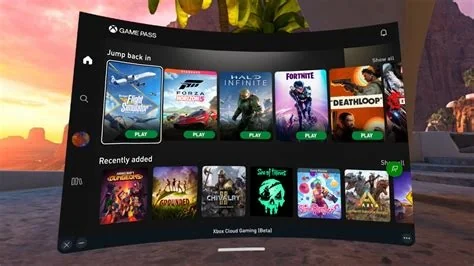
Xbox Cloud Gaming now offers a console‑like web dashboard in public preview, delivering a unified navigation bar, high‑resolution library view, one‑click play buttons, smooth animations, and cross‑device consistency. The preview works in any compatible browser without requiring an Xbox Game Pass subscription, providing the most frictionless way to experience cloud gaming on the web.
New Dashboard Features and How to Access
The refreshed web interface introduces several key improvements:
- Unified navigation bar that always displays Home, Library, Explore, and Settings.
- Scrollable library grid with high‑resolution cover art and hover animations.
- One‑click Play button on each title tile, eliminating the extra confirmation step.
- Responsive design optimized for desktop and tablet browsers.
- Instant preview mode that requires no additional software downloads.
To try the new UI, simply visit the Xbox Cloud Gaming web portal, toggle the “Try the new UI” option, and sign in with a Microsoft account.
Why the Redesign Matters
The dashboard aligns the web experience with the Xbox Series X/S console layout, narrowing the gap between physical console play and cloud streaming. By standardizing the interface across devices, Microsoft can roll out future features—such as cross‑save prompts, social overlays, and integrated voice chat—more efficiently, strengthening the overall Game Pass ecosystem.
Feedback Mechanism
During the public preview, a built‑in feedback button lets users submit comments directly to the Xbox team. This open‑beta approach enables Microsoft to gather real‑world usage data and iterate quickly, ensuring the final release meets player expectations.
Potential Market Implications
The console‑style web UI lowers the entry barrier for casual gamers who prefer browser play over dedicated hardware. A seamless, subscription‑free trial experience could convert browsers into paying Game Pass members. Additionally, the richer visual cues set a new benchmark for competing cloud gaming services, potentially giving Xbox Cloud Gaming a competitive edge.
What’s Next
The preview will run for several weeks while Microsoft collects usage metrics and user sentiment. Planned future updates may include customizable themes, deeper integration with the Xbox mobile app, and expanded support for Bluetooth controllers and other peripherals.
Anyone interested can explore the new design by visiting the Xbox Cloud Gaming web portal, opting into the preview, and navigating the console‑style dashboard.


