
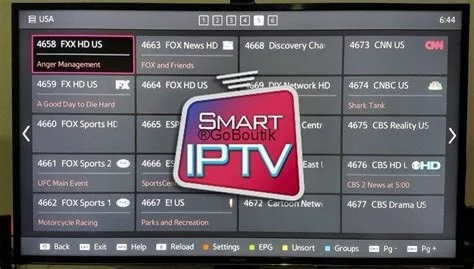
IPTV streams live TV, on‑demand series, and movies over your broadband connection, letting you watch on smart TVs, phones, tablets, or laptops. It replaces costly cable bundles with flexible, high‑definition streams that start in minutes, require only a stable internet link, and give you control over what you watch and where.
How IPTV Works and Why It Matters
Unlike traditional cable or satellite, IPTV delivers video packets through your internet service, which means you can pull content on any device that supports the app. This approach reduces the need for bulky set‑top boxes and gives providers a chance to optimize bandwidth, security, and user experience.
Streaming Over Broadband vs. Traditional Cable
- Bandwidth efficiency: IPTV uses adaptive bitrate streaming to match your connection speed.
- Device flexibility: Watch on TVs, smartphones, tablets, or computers without extra hardware.
- Content control: Choose from live channels, on‑demand libraries, and personal recordings.
Choosing the Right IPTV Service
Not every provider delivers the same quality. To avoid buffering nightmares and unreliable streams, focus on a few core criteria.
Key Factors to Evaluate
- Channel variety: Look for a lineup that matches your favorite genres and regional channels.
- Streaming quality: Services that consistently offer HD or 4K streams are worth the extra cost.
- Pricing transparency: A clear monthly fee without hidden charges helps you stay within budget.
- Customer support: Responsive help desks can resolve setup hiccups quickly.
Simple IPTV Setup on Smart TVs
Getting IPTV up and running on a smart TV is easier than you might think. Most major TV brands support dedicated IPTV apps that you can install directly from the app store.
Step‑by‑Step Installation Guide
- Open your TV’s app store and search for an IPTV app (e.g., Smart IPTV, IPTV Smarters).
- Download and launch the app.
- Enter the subscription’s M3U playlist URL or login credentials.
- Confirm the connection and start browsing channels.
For the best experience, ensure your broadband speed is at least 25 Mbps for 4K content and consider a wired Ethernet connection to eliminate Wi‑Fi interference.
Cost Savings and Flexibility
A typical cable bundle can cost $100‑$150 per month, while a premium IPTV subscription often stays under $30. Besides the price cut, you gain on‑demand libraries that rival major streaming platforms, and you can watch on multiple devices without paying extra for each screen.
Hosting Requirements for Smooth Streaming
Behind every reliable IPTV service is a robust hosting infrastructure. Providers need data centers that can handle high traffic, protect streams from attacks, and keep uptime near 100%.
Bandwidth, Uptime, and Security Essentials
- Optimized bandwidth: Sufficient capacity prevents lag during live events.
- 24/7 monitoring: Real‑time alerts catch latency spikes before they affect viewers.
- DDoS mitigation: Protects the service from traffic overload attacks.
- Encrypted streams and DRM: Safeguards premium content from piracy.
Industry Impact and Future Outlook
Broadcasters are launching their own over‑the‑top platforms to stay relevant, while telecom operators bundle IPTV with fiber packages to retain customers. Content creators are negotiating new licensing models that reflect internet delivery rather than linear broadcast slots.
What This Means for You
Choose a vetted IPTV provider, follow a reliable setup guide, and make sure your home network can handle the load. With the right tools, you’ll enjoy a cable‑free, on‑demand world without the usual headaches.


