
iOS 26.2 introduces visual tweaks, expanded browser options, and productivity upgrades, while iOS 26.2.1 adds second‑generation AirTag support and addresses a battery‑drain problem reported on newer iPhone models.
iOS 26.2 Feature Overview
Visual Customization Enhancements
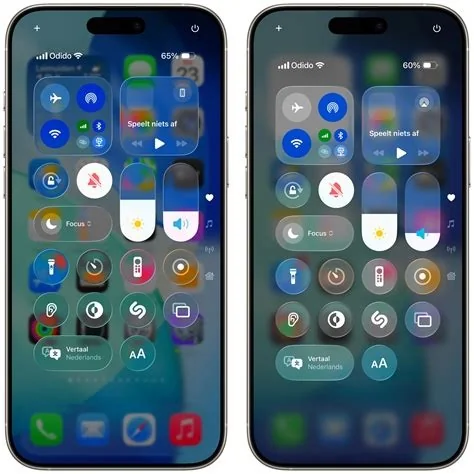
The “Liquid Glass” effect now includes a transparency slider for the lock screen and Control Center, letting users fine‑tune translucency without losing legibility.
Notification Improvements
A new “flash” option adds a brief screen pulse when a notification arrives. The setting can be enabled per app, providing a visual cue in noisy environments.
Browser Default Options
iOS 26.2 expands the default‑browser selection to include third‑party browsers such as Chrome and Edge. Links opened from other apps can now launch the chosen browser while still using Apple’s WebKit engine for security.
Productivity App Updates
- Reminders: Supports multiple geofences for location‑based triggers.
- Podcasts: Introduces a “smart queue” that orders episodes based on listening history and user preferences.
Media and Connectivity Tweaks
- Apple Music: Displays a subtle “now playing” overlay on the lock screen.
- AirDrop: Shows a preview of nearby devices within 5 meters before transfer.
Gaming Optimizations
Low‑latency mode is extended to additional titles, and the Game Center UI receives a refreshed layout that highlights friend activity.
iOS 26.2.1 AirTag Support and Bug Fixes
Second‑Generation AirTag Compatibility
The update adds refined precision‑finding algorithms and expands the “Find Nearby” radius for the new AirTag model, ensuring seamless handoff across iPhone, iPad, and Mac.
Stability and Performance Patches
- Battery‑drain mitigation targeting an indexing issue that caused excess background activity.
- Thermal‑management adjustments to reduce sustained CPU spikes on older iPhone models.
- Minor camera HDR pipeline tweaks and Bluetooth handoff improvements.
Battery‑Drain Issue After iOS 26.2.1
Reported Symptoms
Within hours of installing 26.2.1, users of iPhone 12 and iPhone 13 series reported abnormal battery consumption and increased device heat. While Apple attributes the behavior to post‑update indexing, some devices experience persistent drain beyond the expected 48‑hour window.
Recommended Workarounds
- Disable Background App Refresh for non‑essential apps.
- Turn off the new Notification Flash feature, which can trigger the display driver frequently.
- Manually reset the indexing queue by toggling Location Services off and on.
Implications for Users and Developers
The focus on incremental visual and functional refinements aligns with industry trends toward personalization without sacrificing battery life. AirTag 2nd‑gen support deepens the “Find My” ecosystem, while the expanded browser default setting opens new integration possibilities for WebKit‑based extensions. Developers should test background tasks against the new indexing behavior and consider fallback UI for the optional flash notification.
Practical Guidance for Different Audiences
iOS Developers
- Use Instruments’ “Energy Log” to detect unexpected wake‑ups introduced by the 26.2.1 indexing changes.
- Provide an optional UI path when the flash notification is enabled to avoid duplicate visual cues.
IT Administrators
- Deploy iOS 26.2 to a pilot group first and monitor battery health via Apple Business Manager.
- Inform end‑users about the temporary nature of the indexing‑related drain and share the mitigation steps.
Power Users
- Set your preferred third‑party browser as the default to streamline web workflows.
- Adjust the Liquid Glass transparency slider for optimal readability in various lighting conditions.
Future Outlook
Apple’s rapid cadence—feature‑focused 26.2 followed by bug‑fix‑centric 26.2.1—demonstrates a commitment to keeping iOS both fresh and stable. Although the battery‑drain reports highlight the impact of minor updates, Apple’s history of timely corrective patches suggests the issue will be resolved without lasting effects. Users can enjoy the new visual and functional enhancements while keeping an eye on battery performance and applying the interim workarounds as needed.


