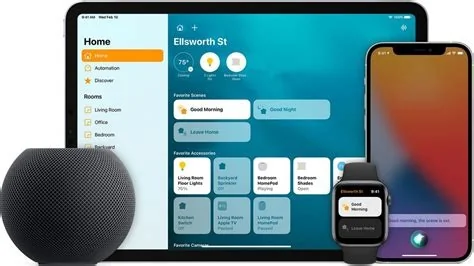
Apple officially retired the original HomeKit framework on February 10, 2026, forcing every accessory to switch to the new HomeKit 2.0 architecture built on Matter. From that day, iPads can’t act as primary hubs, legacy devices stop responding, and only HomePod mini, Apple TV 4K, or compatible iPads can control your smart home. Here’s what you must do.
What Triggered the HomeKit 2.0 Migration?
Hard Cut‑off Details
On February 10, 2026 Apple disabled the legacy HomeKit stack. After the deadline, iPads no longer serve as primary Home hubs, and any accessory that hasn’t received a Matter‑compatible firmware update simply becomes unreachable. The Home app will show “Device not reachable” errors and may refuse to load scenes that contain outdated devices.
How the New Architecture Works
Matter‑Based, IP‑Driven Model
HomeKit 2.0 replaces Apple’s proprietary authentication with a Matter‑based protocol that runs over IP. This shift removes the need for a cloud‑centric bridge and consolidates security under the Connectivity Standards Alliance’s audited framework.
New Hub Options
Only HomePod mini, Apple TV 4K, and iPads running iOS 18 or later can act as the central controller. These devices provide a more reliable, always‑on connection and eliminate the “iPad as hub” workaround that many users relied on.
Immediate Steps for Users
Check Firmware Updates
Most major manufacturers—Eve, Aqara, Philips Hue, Lutron, and others—have already released Matter‑compatible firmware. Open each device’s companion app, look for an update, and install it before the cut‑off. If no update exists, the accessory will likely stop working.
Choose a New Hub
If you’ve been using an old iPad as your hub, you’ll need to migrate to a HomePod mini, Apple TV 4K, or a newer iPad that supports the new hub role. The Home app will prompt you to designate a new hub the first time you launch it after February 10.
Expect a Brief Re‑registration
Even with updated firmware, accessories may take a few minutes to re‑register with the new hub. This is normal; HomeKit 2.0 performs a full device‑authentication handshake the first time it sees a Matter‑enabled accessory.
Impact on the Smart‑Home Market
Apple’s forced migration accelerates Matter adoption across the industry. With millions of homes now required to run Matter, manufacturers have a stronger incentive to ship Matter‑ready devices from day one. The unified protocol also reduces the attack surface that existed between Apple’s proprietary cloud and third‑party clouds.
Smaller developers may feel the pressure, especially if they lack resources to push firmware updates quickly. Some niche accessories—particularly older Zigbee bridges—might never receive a Matter update, nudging users toward newer hardware.
Pro Installer’s Checklist
Audit Devices
- Identify every accessory in the ecosystem.
- Flag any device that lacks Matter support.
Backup Configurations
- Export scenes and automations from the Home app before the cut‑off.
- Store the backup in a safe location in case you need to restore it later.
Communicate Changes
- Explain the migration timeline to homeowners.
- Provide clear guidance on which devices need replacement or firmware updates.
- Offer a realistic schedule that aligns with Apple’s February 10 deadline.
What’s Next for Apple’s Smart Home?
While Apple hasn’t confirmed future plans, the company is likely to deprecate legacy HomeKit APIs entirely in upcoming iOS releases. That would make Matter the sole pathway for new features such as adaptive lighting and advanced presence detection. For now, focus on updating firmware, selecting a supported hub, and enjoying a more interoperable, secure home.
So, is your smart home ready for the new era? If you’ve already checked firmware and swapped out that old iPad, you can breathe easy. If not, you’ve got a few days left to avoid a silent house and keep the lights on.