
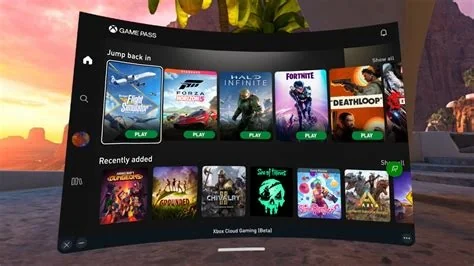
Xbox Cloud Gaming now supports 40 additional titles that can be streamed directly from the cloud, plus a redesigned web interface that streamlines navigation and settings across consoles, PCs, mobile devices, and TVs. The updates let Game Pass Ultimate members play owned games without downloads, improve cross‑device continuity, and introduce low‑latency options for smoother gameplay.
New Features in Xbox Cloud Gaming
- 40 Additional “Stream Your Own Game” titles – Players can stream games they already own on Xbox consoles or Windows PCs to Xbox Series X|S, Windows PCs, Android, iOS, and smart TVs without local installation.
- Redesigned web user interface – A cleaner layout provides faster navigation between games, quick access to graphics quality settings, controller mapping, and a dedicated low‑latency mode.
- Cross‑device play guides – Step‑by‑step instructions outline the required 5 Mbps connection, compatible controllers, and the need for a Game Pass Ultimate subscription.
Why It Matters for Gamers
Reduced Hardware Barriers
Players no longer need a high‑end console or powerful PC to run graphically demanding titles. The cloud handles rendering, delivering consistent performance as long as the internet connection meets the minimum bandwidth.
Potential Cost Savings
One Game Pass Ultimate subscription now grants access to both the streaming catalog and the ability to stream owned games, lowering the need for multiple console purchases in households with several gamers.
Performance Trade‑offs
While cloud rendering offloads processing, latency can affect fast‑paced competitive games. The new UI’s low‑latency mode prioritizes input responsiveness over visual fidelity to mitigate this issue.
Content Discovery
The expanded library encourages players to revisit older or niche titles they own but haven’t played in years, knowing they can launch them instantly from any device.
Developer Insights
Independent studio lead Maya Patel shared practical observations after porting her indie title “Echoes of Dawn” to Xbox Cloud Gaming:
“The ‘Stream Your Own Game’ pipeline simplified our QA process. Instead of testing on every console generation, we could validate performance on the cloud and trust that the service would handle hardware variations. The new UI’s quick‑launch feature also reduced the time it takes for players to get into the game, which is crucial for retention.”
Patel noted that developers needed to ensure cloud‑compatible input schemes, especially for touch and hybrid controller setups, adding lightweight on‑screen touch layouts for mobile streaming.
Future Outlook
Microsoft’s roadmap hints at continued expansion of supported titles, further latency‑mitigation technologies, and possible integration of AI‑driven graphics upscaling to improve visual quality on lower‑end devices. The combination of a larger “Stream Your Own Game” catalog, an intuitive web interface, and comprehensive cross‑device guides positions Xbox Cloud Gaming as one of the most accessible streaming platforms available today.


