
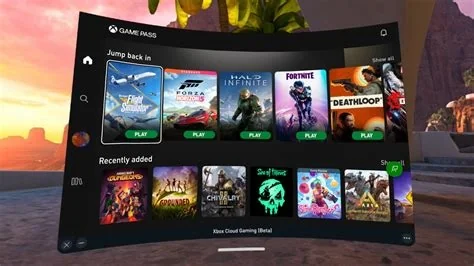
Xbox Cloud Gaming now offers a redesigned web interface that lets anyone launch hundreds of console‑grade titles directly from a browser, while expanding compatibility to PCs, Android, iOS, smart TVs, streaming sticks, and select car infotainment systems. The preview is open to all users, though full game streaming still requires an Xbox Game Pass Ultimate subscription.
Play Anywhere from the Browser
The updated service is accessed at Xbox.com/play, where users can sign in, pick a game, and start streaming instantly on Chrome, Edge, or Safari. No console, high‑end PC, or dedicated app is needed.
Supported Devices
Microsoft lists the following minimum requirements for optimal performance:
- Desktop PCs: Windows 10/11, Intel i5‑class CPU, 8 GB RAM, 10 Mbps internet
- Android phones/tablets: Android 7.0+, 3 GB RAM
- iOS devices: iOS 14 or later
- Other hardware: Select smart TVs, streaming sticks, and web‑enabled car infotainment systems
How Xbox Cloud Gaming Works
Game processing runs on Microsoft Azure data centers. Video frames are streamed to the user’s device, while input commands travel back to the server in near‑real time, delivering a console‑like experience without local hardware.
New Web UI Highlights
The preview redesign focuses on speed and discoverability:
- Streamlined home screen with featured titles and personalized recommendations
- Quick‑launch carousel for recently played games
- Consolidated navigation tabs to reduce clicks
- Play Now button that skips the “Add to Library” step for Game Pass Ultimate members
No Subscription Required to Test
Anyone can explore the new interface by signing in with a Microsoft account. While actual game streaming still needs an active Game Pass Ultimate membership, the open preview lets Microsoft collect broader feedback before a full launch.
Business Implications
By bundling the service with Game Pass Ultimate, Microsoft encourages users to stay within its ecosystem, reducing the need for separate console purchases. Wider device support lowers entry barriers for casual gamers, potentially expanding the subscriber base.
Limitations to Keep in Mind
- Stable broadband is essential: at least 10 Mbps for 720p, 20 Mbps for 1080p streaming
- Latency varies with proximity to Azure data centers
- Some titles with strict DRM or anti‑cheat requirements may be unavailable
- No local multiplayer split‑screen support at present
Future Outlook
Microsoft plans to iterate on the web UI based on user feedback, adding deeper Xbox Live social integration, expanded controller support for browsers, and refined performance metrics. As Azure’s global footprint grows, latency concerns should diminish, making cloud gaming an increasingly viable alternative to traditional hardware.


