
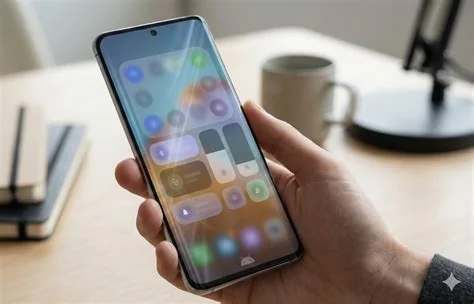
Android 17 introduces a system‑wide blur effect that gives the UI a frosted‑glass look, replacing solid backgrounds across volume sliders, quick‑settings, and the notification shade. It also adds a native screen‑recording tool directly in quick‑settings, offering resolution, frame‑rate, and audio options without leaving the current screen. These changes signal a major visual and functional refresh.
System‑Wide Blur Redefines Visual Design
The new blur is applied to core system elements such as the volume slider, quick‑settings tiles, notification shade, and power‑off menu. By allowing the wallpaper to subtly show through, the UI gains depth while maintaining readability. This cohesive frosted‑glass aesthetic marks a shift from the flat, solid backgrounds of previous Android versions.
Native Screen Recorder Integrated in Quick‑Settings
A built‑in screen recorder appears directly in the quick‑settings panel. Users can start recording with a single tap and adjust resolution, frame rate, and audio source on the fly, eliminating the need for third‑party recording apps. The streamlined interface keeps users within the current screen context.
Key Recorder Features
- Resolution selection for high‑quality captures
- Adjustable frame‑rate to balance smoothness and file size
- Choice of audio source, including microphone and system audio
Additional UI and Functional Tweaks
Beyond blur and recording, Android 17 refines several system controls:
- Updated app‑lock settings with clearer toggles
- Enhanced gesture navigation cues for smoother interactions
- Modernized media player UI that follows the blurred design language
Design Evolution Context
Android’s visual language has progressed from skeuomorphic designs to flat Material Design. Recent releases refined color palettes and motion but retained solid system panels. The blur‑centric approach of Android 17 aligns the platform with contemporary design trends, offering a more immersive and cohesive user experience.
Implications for Developers
Developers may need to consider how their apps interact with the new transparency standards. While system‑wide blur is optional for third‑party apps, adhering to the visual guidelines can ensure seamless integration. The native screen recorder could reduce demand for external recording tools, prompting developers to focus on complementary features such as post‑recording editing or cloud sharing.
User Experience Impact
The blurred UI creates continuity between the home screen and overlay panels, especially on devices with dynamic wallpapers. This visual depth can enhance perceived fluidity and modernity, making everyday interactions feel more polished.
Future Outlook
Further details, such as customization options for the blur effect or storage management for recordings, are expected in the upcoming Android 17 Developer Preview. That preview will allow developers and enthusiasts to test these features hands‑on and provide feedback before the public release.


