
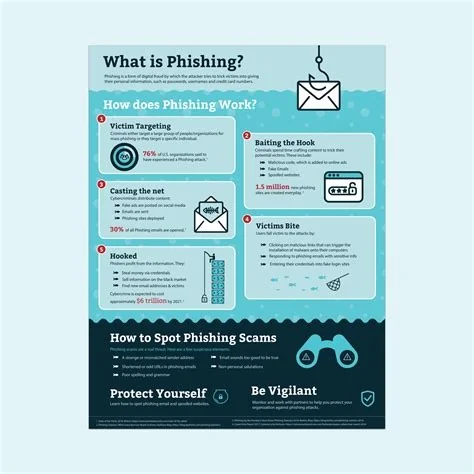
Phishing is a deceptive social‑engineering attack that tricks you into revealing credentials, personal data, or installing malware. Attackers mimic trusted brands, use urgent language, and hide malicious links in emails, texts, or messages. By recognizing the common signs and applying layered safeguards—like verifying URLs, enabling multi‑factor authentication, and keeping software updated—you can stop most phishing attempts before they succeed.
Understanding Phishing: How It Works
At its core, phishing relies on impersonation. Cybercriminals pose as banks, colleagues, or popular services to lure you into a false sense of security. They deliver the bait through email, SMS, phone calls, or direct messages, hoping you’ll click a malicious link or open a dangerous attachment. Once you comply, they gain access to passwords, credit‑card numbers, or a foothold for further attacks.
Emerging Phishing Techniques
Clone Phishing Explained
Clone phishing takes a legitimate message you’ve already received, copies its content, and swaps the original attachment or link for a malicious one. Because the surrounding text and sender address look familiar, your guard often drops. This method shows how attackers now replicate the exact look and feel of trusted communications, making the deception harder to spot.
Why Phishing Is Growing
The rise isn’t just about prettier designs; it’s driven by an expanding attack surface. Remote work, cloud collaboration tools, and mobile messaging create new channels for scammers. Each platform introduces subtle quirks that can be weaponized, and many users haven’t yet built the habit of scrutinizing every link or attachment.
Red Flags You Can’t Ignore
- Urgent language – Phrases like “Your account will be closed” or “Immediate action required” pressure you to act quickly.
- Mismatched URLs – Hover over links; if the domain looks off (e.g., “paypa1.com” instead of “paypal.com”), it’s a giveaway.
- Unexpected attachments – PDFs, ZIPs, or executables from unknown senders should raise eyebrows.
- Generic greetings – “Dear Customer” instead of your name hints at a mass‑mail blast.
Impact on Individuals and Businesses
For a regular user, a successful phishing bite can drain bank accounts, lead to identity theft, or compromise a home network. For organizations, a single stolen credential can enable lateral movement, data exfiltration, and costly ransomware incidents. While email gateways and AI‑driven detection help, human vigilance remains the final line of defense.
Strengthening Your Defense
Immediate Actions You Can Take
- Verify before you click – Open a new browser window and type the organization’s URL manually instead of following a link.
- Enable multi‑factor authentication (MFA) – Even if credentials are stolen, a second factor blocks unauthorized access.
- Keep software patched – Updated browsers and email clients often include anti‑phishing filters.
- Use a reputable security suite – Real‑time protection can flag known malicious URLs and attachments.
- Report suspicious messages – Forward phishing emails to your IT team or a designated security address to help track emerging campaigns.
Future Outlook
Phishing won’t disappear; it will evolve. As deep‑fake audio and AI‑generated text become more accessible, attackers will blend visual fidelity with conversational realism, making the “trust but verify” mantra even more crucial. Staying informed, practicing disciplined skepticism, and leveraging layered security controls are your best bets against a threat that thrives on human error.

