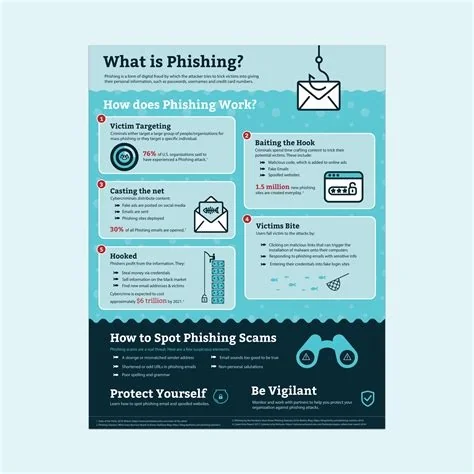
Phishing is a deceptive technique where attackers masquerade as trusted entities to steal credentials, financial data, or install malware. It can appear in emails, texts, phone calls, or fake websites, often using urgent language to pressure you into acting quickly. Understanding the common tricks and applying layered safeguards—like verifying sources, spotting red flags, and using MFA—can stop most attempts before they cause damage.
Why Phishing Works So Well
Scammers rely on human psychology: they exploit trust, curiosity, and the fear of missing out. By mimicking familiar brands, using official‑looking logos, and crafting messages that demand immediate action, they create a sense of urgency that bypasses rational thinking. When you feel rushed, you’re more likely to click a link or share sensitive information without double‑checking.
Typical Phishing Vectors
Phishing isn’t limited to email. Modern attacks show up in several forms:
- Email phishing: Fake messages that look like invoices, account alerts, or delivery notices.
- SMiShing: Text messages that contain malicious links or request personal data.
- VoIP/Vishing: Phone calls where the attacker pretends to be tech support or a bank representative.
- Clone sites: Duplicate webpages that capture login credentials when you think you’re on the real site.
Red Flags to Spot a Phishing Attempt
Even a quick glance can reveal a scam. Keep an eye out for:
- Misspelled words or awkward phrasing.
- Generic greetings such as “Dear Customer” instead of your name.
- Urgent or threatening language (“Your account will be suspended”).
- Unexpected attachments or links that don’t match the sender’s domain.
- Requests for personal data that a legitimate organization would never ask via email or text.
7 Steps to Protect Yourself
Follow this layered approach to keep your data safe:
- Verify the source. Open a new browser window and log in directly to the service instead of clicking links.
- Check the address. Hover over links to see the real URL; look for misspellings or extra characters.
- Enable multi‑factor authentication (MFA). Even if credentials are stolen, a second factor stops the attacker.
- Keep software up to date. Patches close vulnerabilities that phishing payloads often exploit.
- Use reputable anti‑malware tools. Modern solutions can flag known phishing domains and suspicious attachments.
- Educate yourself and your team. Regular training and simulated phishing exercises improve detection rates.
- Report suspicious messages. Forward them to your IT or security team so they can block the source for everyone.
Staying Ahead of Evolving Threats
As AI makes it easier to generate convincing fake content, the line between genuine and forged communications will keep blurring. The best defense is a habit of skepticism: always double‑check requests through an independent channel, and rely on technical safeguards like MFA and advanced email filtering. By staying vigilant, you can turn a potential phishing hook into a missed opportunity for the attacker.