
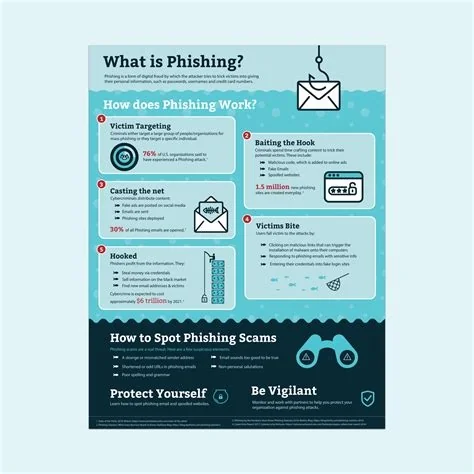
Phishing is a fraud technique where attackers masquerade as trusted entities to steal your credentials, personal data, or install malware. By mimicking legitimate emails, texts, or calls, they trick you into clicking malicious links or sharing sensitive information. Understanding the common tricks and applying simple safeguards can stop these scams before they compromise your accounts or devices.
What Is Phishing and Why It Matters
Phishing exploits social engineering to harvest login details, financial info, or install harmful code. The threat has grown more sophisticated, with fake login pages that look identical to real ones, making traditional red‑flag checks less reliable. When a phishing attempt succeeds, it can lead to identity theft, financial loss, or a breach that spreads across an entire organization.
Modern Phishing Variants
- Clone phishing – Recreates a legitimate email you previously received, swaps the attachment or link for a malicious version, and resends it.
- Smishing – Sends a deceptive SMS that appears to come from a carrier or delivery service, urging you to click a harmful link.
- Vishing – Uses phone calls, often with spoofed caller IDs, to ask for verification details under the guise of a bank representative.
- Spear phishing – Targets you specifically by using personal data gathered from social media to craft a convincing lure.
- Whaling – A high‑level spear phishing attack aimed at executives, typically to authorize fraudulent wire transfers.
Key Warning Signs to Identify Phishing
- Unexpected urgency – Messages that claim your account will be closed or suspended unless you act immediately.
- Mismatched URLs – Hover over links; look for misspelled domains or subtle character changes (e.g., “paypa1.com”).
- Generic greetings – “Dear Customer” instead of your actual name.
- Odd phrasing or grammar – Errors can indicate a hastily assembled scam.
- Requests for credentials – Legitimate companies never ask for passwords or verification codes via email or text.
If something feels off, trust your instincts and verify before you click.
Impact on Individuals and Organizations
For you, a successful phishing bite can mean stolen identities, drained accounts, or a compromised home network. For businesses, a single click can give attackers footholds that spread laterally, leading to data exfiltration, ransomware, or costly downtime. The growing sophistication of phishing erodes trust in digital communications, slowing legitimate workflows.
Effective Defense Strategies
Technical Controls
Implement email authentication protocols such as SPF, DKIM, and DMARC to confirm that messages truly originate from the claimed domain. Deploy advanced email filters that quarantine suspicious content, and use endpoint protection that monitors behavior to block malicious scripts even if they slip through.
User Education and Practices
Regular training keeps phishing awareness fresh. Simulated phishing campaigns and real‑time alerts remind you to stay vigilant. Encourage a culture where questioning unexpected requests is normal, and make reporting suspicious messages easy for everyone.
Immediate Actions You Can Take
- Verify links by opening a new browser tab and typing the official website address yourself.
- Enable multi‑factor authentication (MFA) to add a second barrier even if credentials are stolen.
- Keep all software, especially browsers and plugins, up to date to patch known vulnerabilities.
- Use a reputable email filter that automatically isolates potentially harmful messages.
- Report phishing attempts to your IT department or a trusted anti‑phishing organization.
By staying alert, leveraging the right tools, and fostering a skeptical mindset, you can keep scammers at bay and protect your digital life.

