
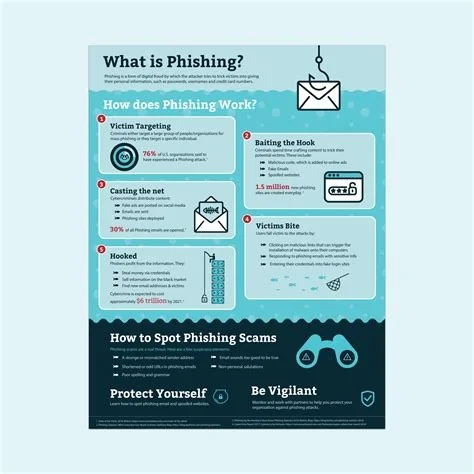
Phishing is a social‑engineering attack that tricks you into revealing passwords, credit‑card numbers, or installing malware by masquerading as a trusted source. Scammers use email, SMS, voice calls, or fake websites—often with HTTPS and familiar branding—to steal credentials or deploy ransomware. Spotting the signs and using safe habits can stop the fraud before it hits.
How Phishing Works
Attackers start with a convincing message that appears to come from a bank, retailer, or colleague. The message contains a link or attachment that redirects you to a counterfeit login page or drops malicious code. When you enter your details, the data is captured instantly, giving the attacker real‑time access.
Common Delivery Channels
- Email phishing – the classic lure with fake links or attachments.
- Smishing – fraudulent SMS that asks you to click a short URL.
- Vishing – voice calls where scammers request personal info.
- Social‑media impersonation – fake profiles that request credentials.
Why Modern Phishing Is Harder to Detect
Today’s fake sites often use valid HTTPS certificates, so the padlock icon no longer guarantees safety. Attackers also employ “transparent mirroring,” copying every visual cue of the legitimate site, which can even bypass two‑factor prompts. This realism makes the deception feel genuine until it’s too late.
Potential Consequences
Compromised credentials can lead to identity theft, unauthorized purchases, or corporate espionage. Malware delivered through phishing can encrypt files for ransom or install backdoors for long‑term infiltration. For businesses, a single successful spear‑phishing email can expose an entire network, costing millions in remediation and reputation damage.
How to Protect Yourself
Here are practical steps you can take right now:
- Hover over every link to reveal the actual URL before clicking.
- Watch for mismatched domains, generic greetings, or urgent language.
- Never enter credentials on a page you reached via an unsolicited message—type the address directly into your browser.
- Use multi‑factor authentication wherever possible.
- Keep your software and browsers up to date to patch known vulnerabilities.
What to Do If You Suspect a Phish
If something feels off, report the message to your IT or email provider, then delete it. Change any passwords that may have been exposed, and monitor your accounts for unusual activity.
Building a Phishing‑Resilient Culture
Technology alone won’t stop every attack. Encourage a healthy dose of skepticism: ask yourself whether a bank would ever request your password via email, or if a colleague would share a file through an unknown cloud service without prior discussion. Regular training and simulated phishing exercises keep awareness sharp and turn mistakes into learning moments.
Key Takeaways
- Phishing exploits trust, not just technology.
- HTTPS and polished design no longer guarantee legitimacy.
- Vigilant habits—checking URLs, questioning urgency, using MFA—are your best defense.
- Continuous education and layered security keep both individuals and organizations ahead of attackers.

