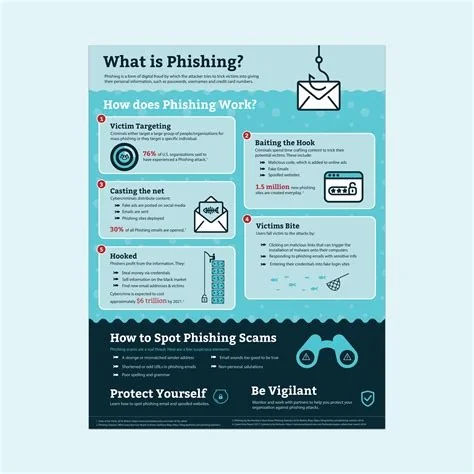
Phishing is a social‑engineering attack where cybercriminals pretend to be trusted entities to trick you into revealing sensitive information. They deliver deceptive emails, texts, or calls that look legitimate, then urge you to click a link, download a file, or share credentials. Understanding this core tactic helps you spot and stop the fraud before it compromises your data.
What Exactly Is Phishing?
At its core, phishing exploits human psychology rather than technical vulnerabilities. Attackers craft messages that mimic banks, colleagues, or popular services, hoping you’ll act quickly without double‑checking the source.
Common Phishing Vectors
Email Phishing
Most attacks arrive in inboxes that appear to come from familiar brands. They often contain:
- Urgent language (“Your account will be locked”)
- Links that lead to counterfeit login pages
- Attachments packed with malware
SMS Phishing (Smishing)
Text messages may claim a delivery issue or a security alert, prompting you to tap a malicious link.
Voice Phishing (Vishing)
Scammers call, impersonating support agents, and ask you to confirm personal details over the phone.
Why Phishing Works So Well
Humans are wired to trust authority and respond to urgency. When a message says you’ll lose access unless you act now, your brain jumps into “fight‑or‑flight” mode, and the “flight” response—clicking the link—often wins. The attack doesn’t need sophisticated code; a convincing façade is enough.
Impact of a Successful Phish
Once you hand over credentials, attackers can:
- Steal money from personal or corporate accounts
- Commit identity theft
- Deploy ransomware after gaining a foothold
- Harvest data for future scams
For businesses, a single compromised email can cascade into a full‑scale breach, damaging reputation and eroding customer trust.
How You Can Protect Yourself
Spot the Red Flags
- Misspelled domain names or URLs
- Generic greetings like “Dear Customer”
- Unexpected attachments or links
- Requests for personal data via email or text
Immediate Actions
- Verify the sender through a separate channel—call the bank using the number on your statement, not the one in the email.
- Enable multi‑factor authentication (MFA) on all accounts.
- Keep your operating system and applications up to date.
- Never reuse passwords across different services.
Enterprise‑Level Defenses
Technical Controls
- Deploy email security gateways that use AI to detect anomalous language and metadata.
- Implement DMARC, SPF, and DKIM to authenticate inbound messages.
- Enforce MFA for privileged accounts and remote access.
- Segment networks to limit lateral movement after a breach.
Human‑Centric Strategies
- Run regular phishing simulations to keep staff alert.
- Integrate security awareness into onboarding and ongoing training.
- Establish clear incident‑response procedures so reported attempts are investigated quickly.
Practitioner Insight
Security analysts observe that phishing kits—ready‑made templates for fake login pages—are now sold on underground markets, lowering the skill barrier for attackers. They also note a shift toward targeting collaboration tools like Teams and Slack, meaning defenses must extend beyond traditional email filters.
By combining vigilant habits with layered technical safeguards, you can dramatically reduce the chance that a phishing attempt succeeds. Remember: trust, but always verify.