
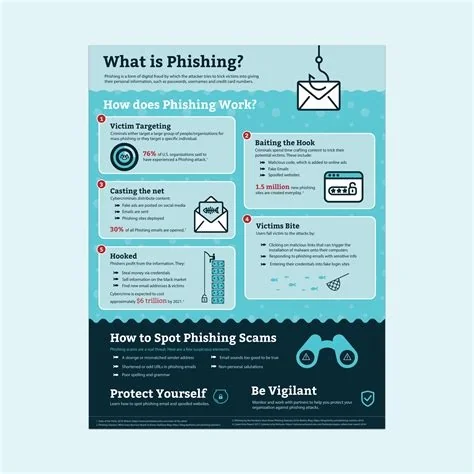
Phishing is a social‑engineering trick where attackers pose as trusted entities to steal your passwords, credit‑card numbers, or other sensitive data. It works by exploiting human trust and urgency, often through deceptive emails, texts, or calls. You can protect yourself by spotting red flags, using multi‑factor authentication, and keeping your software up to date.
How Phishing Works
Attackers craft messages that look legitimate—usually an email, but increasingly SMS (smishing) or voice calls (vishing). The content typically:
- Claims to be from a bank, popular service, or colleague.
- Creates a sense of urgency, like “Your account will be suspended unless you act now.”
- Includes a link to a counterfeit login page or an attachment that drops malware.
When you click the link or reply, the attacker harvests your credentials or installs a keylogger.
Why Phishing Still Succeeds
Human psychology is the weakest link. You’re wired to trust familiar brands and react quickly to perceived threats. Because the attack relies on deception rather than technical exploits, it remains low‑cost and high‑return for cybercriminals.
Psychological Triggers
- Authority: Posing as a bank or IT support.
- Urgency: Threatening account suspension or loss.
- Familiarity: Using logos and language that mimic real communications.
Common Phishing Vectors
Beyond traditional email, attackers now use:
- Smishing: Text messages that direct you to fake sites.
- Vishing: Phone calls that request verification codes.
- Domain Spoofing: URLs that look almost identical to legitimate ones.
- Deep‑Fake Voice: AI‑generated calls that sound like a trusted person.
Effective Defense Strategies
Security experts agree that layered protection works best.
Technical Controls
- Deploy email filters and enable DMARC authentication.
- Keep operating systems and applications patched.
- Use a reputable password manager to generate unique credentials.
User Education
Regular training helps you spot misspelled domains, generic greetings, and unexpected attachments. Simulated phishing exercises reinforce good habits.
Multi‑Factor Authentication (MFA)
Even if attackers steal your password, MFA adds a second barrier—usually a one‑time code on your phone—making the stolen credential useless.
Immediate Steps You Can Take
- Hover over every link to verify the true URL before clicking.
- Confirm unsolicited requests for personal data through a separate channel.
- Enable MFA on all accounts that support it.
- Update your software and operating system regularly.
- Consider a password manager to avoid reusing passwords.
Phishing isn’t a future threat; it’s a present‑day reality that thrives on human psychology. By understanding the tactics, staying vigilant, and combining technology with training, you can cut the bait before it hooks you.

