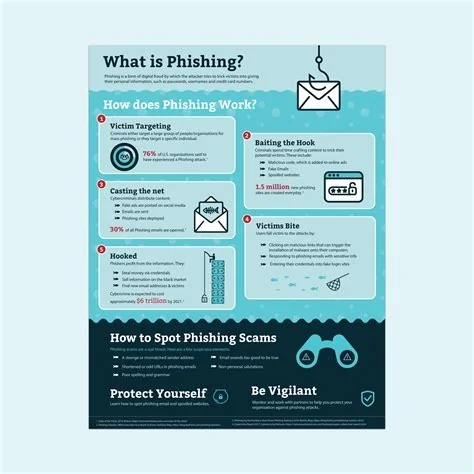
Phishing is a deceptive tactic where attackers pose as trusted entities to steal your credentials, financial data, or personal information. It typically arrives via email, SMS, or voice call, urging you to click a malicious link or open a harmful attachment. Recognizing the signs, using multi‑factor authentication, and keeping software up to date are the fastest ways to protect yourself.
How Phishing Works: The Bait Behind the Message
Phishing relies on social engineering. Attackers craft messages that look legitimate, often adding urgency (“Your account will be suspended”) or a tempting offer (“You’ve won a prize”). When you click the embedded link, you’re taken to a counterfeit login page or a site that silently installs malware on your device.
Common Delivery Methods
- Email phishing – the classic approach, using spoofed sender addresses.
- Smishing – fraudulent SMS texts that contain malicious links.
- Vishing – phone calls that request personal details under false pretenses.
- Social media phishing – direct messages that mimic platform notifications.
Red Flags to Spot a Phishing Attempt
- Mismatched URLs – hover over links; if the domain looks odd, don’t click.
- Generic greetings – “Dear Customer” or “Valued Member” often indicate a mass‑mailed scam.
- Spelling and grammar errors – legitimate companies rarely send error‑filled messages.
- Unexpected attachments – PDFs, Word docs, or ZIP files from unknown senders can hide malware.
- Urgent language – threats of account closure or immediate action aim to bypass your rational thinking.
If any of these signs appear, verify the request through an official channel—call the company’s support line or log in directly via a bookmarked URL.
Popular Phishing Variants
- Spear phishing – highly targeted attacks that use personal details to appear authentic.
- Whaling – attacks aimed at senior executives, often masquerading as board communications.
- Clone phishing – a legitimate email is duplicated, but a malicious link or attachment is swapped in.
- Pharming – DNS manipulation redirects you to fake sites even when you type the correct address.
Why Phishing Protection Matters
A single compromised credential can lead to ransomware, financial loss, and damage to your reputation. For businesses, an employee’s click can open a backdoor to the entire network, triggering costly incident response and regulatory penalties. For individuals, the fallout ranges from identity theft to drained bank accounts.
Expert Tips for Immediate Defense
Security professionals stress that the human element remains the weakest link. Regular phishing simulations keep staff alert, while multi‑factor authentication (MFA) adds a second barrier that stops attackers even if they harvest a password.
Actionable Steps You Can Take Today
- Enable MFA on all accounts—banks, email, cloud services, and social platforms.
- Keep software updated; patches often close vulnerabilities exploited by malicious links.
- Use a reputable password manager to generate unique passwords and avoid reuse.
- Educate yourself and your team with ongoing training and simulated phishing tests.
- Report suspicious messages to your IT department or the service provider’s abuse team.
Phishing isn’t disappearing, but with vigilance, the right tools, and good habits, you can stay one step ahead of scammers. The next time an email urges you to “verify your account now,” pause and ask yourself if it truly needs your immediate action—or if it’s just another hook waiting to be pulled.